This guide is geared towards Lindy Hop, blues, and fusion DJs and is based on my own experience of almost ten years DJing for social dances across these genres.
What are the benefits of DJing from a hard library?
Supporting contemporary working music artists. In 2026, you would have to stream a single track on Spotify 283 times (at $0.003 per stream) to generate the same amount of revenue for the artist ($0.85) as buying the track for $1 on Bandcamp.
Powerful track searching in real time. Tagging your tracks using the comments and other fields in MP3 files lets you find the perfect track instantly. (More on this below.)
Seamless track previewing during sets. If you’ve ever had your phone on airplane mode so you could preview tracks from a streaming service, you know how clunky that is. Imagine doing everything in one program on your computer, where one click lets you preview through your headphones, and another click loads the track to play through the speakers. Ever since I tried DJing this way, I’ve been hooked. It feels more natural and lets me focus on what actually matters – finding the right song to play next.
Audio quality that sounds better through big speakers. A regular MP3 file has better sound quality than most streaming services. High-quality (“lossless”) audio files like FLAC and AAC sound even better. DJing from a hard library makes you sound more professional and creates a better listening experience for dancers.
Less reliance on the internet. No more worrying about whether you downloaded all the playlists you need before going to a venue without wifi – a hard library means all your music is with you, all the time. (This does mean you should back up your library regularly – more on this below.)
Is DJing from a hard library expensive?
I have found that creating a hard library is like curating a capsule wardrobe – I have fewer choices, but I also know that they’re all great choices. I DJ from a small, carefully honed library of tracks I know well and love, and that feels really good to me.
Building a hard library takes time and patience, but it’s comparable in cost to what streaming services charge. In 2026, Spotify costs $13 per month, while Bandcamp or iTunes charge about $1 per track. Let’s say you bought 13 tracks per month for one year. That comes out to 156 tracks. In my opinion, 50 tracks is a great size for a starter library. You could have a library three times that size in one year for the same cost as the most expensive streaming service.
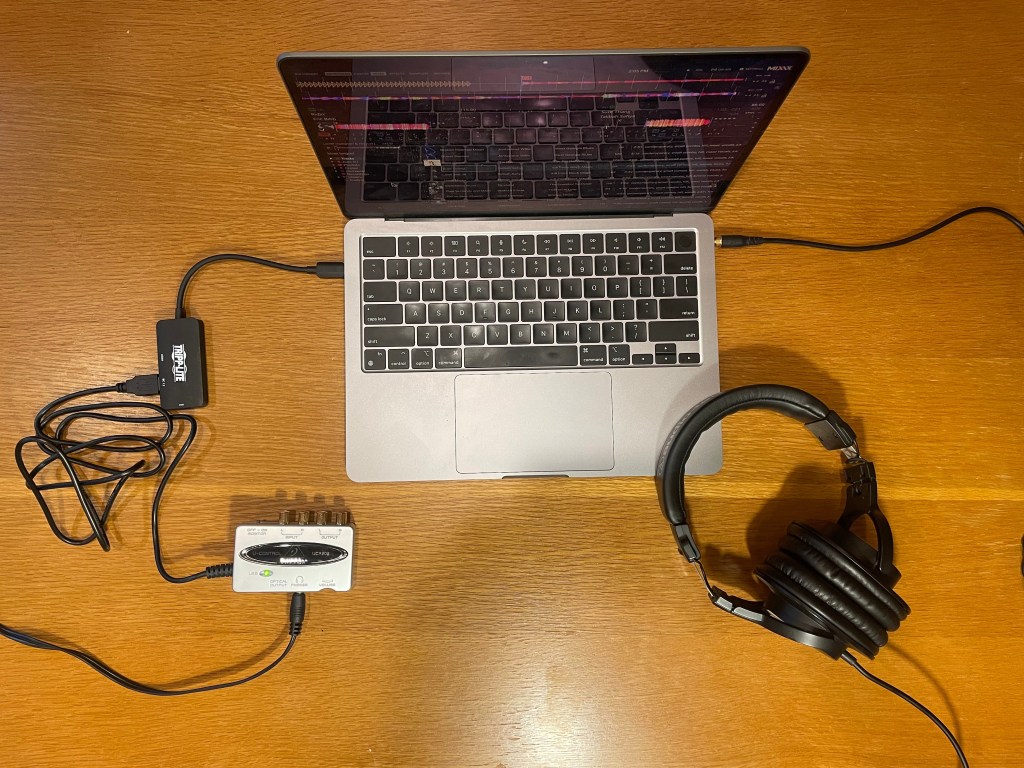
An overhead view of my tech setup for DJing. My Macbook laptop is in the middle, with a pair of over-ear headphones plugged into the built-in aux port on the right for previewing tracks, and a Behringer UCA202 soundcard plugged into the USB-C port on the left, creating a second aux port I can use to connect to external speakers.
What do I need to DJ with a hard library?
A laptop with a 3.5mm aux port to plug in your headphones and a USB port to plug in your soundcard. I have a Macbook with aux and USB-C ports that works fine.
Headphones to preview tracks. Over-ear headphones are easier to hear with professional-grade speakers bumping nearby. Whatever kind of headphones you choose, get ones with a cord you can plug into a 3.5mm aux port. I don’t recommend Bluetooth headphones for DJing because it’s too easy to mix up outputs.
An external soundcard. This essentially creates a second aux port for your computer, so you can preview one track in your headphones and play a different track over speakers simultaneously. The Behringer UCA202 is a widely used and reliable option. For an upgrade pick, consider the Focusrite Scarlett Solo.
A software program that can manage multiple outputs. I highly recommend Mixxx, a free open-source DJ software. Mixxx has a powerful search features, can preview tracks in a single click, and can manage multiple outputs (e.g., previewing to headphones and playing tracks over speakers at the same time). It can also do beatmatching and other stuff that you probably don’t need for social dances (unless you’re one of those cool fusion DJs with an external controller, in which case please contact me so I can take beatmatching lessons from you).
A 3.5mm to stereo RCA cable. Organizers should provide cables for you to connect to their speakers, but I always show up with backup cables just in case and it’s saved the day a few times. (To demystify the terminology, “stereo” means that different sounds go to the left and right speakers, and “RCA” stands for Radio Corporation of America, which created the RCA connector.)
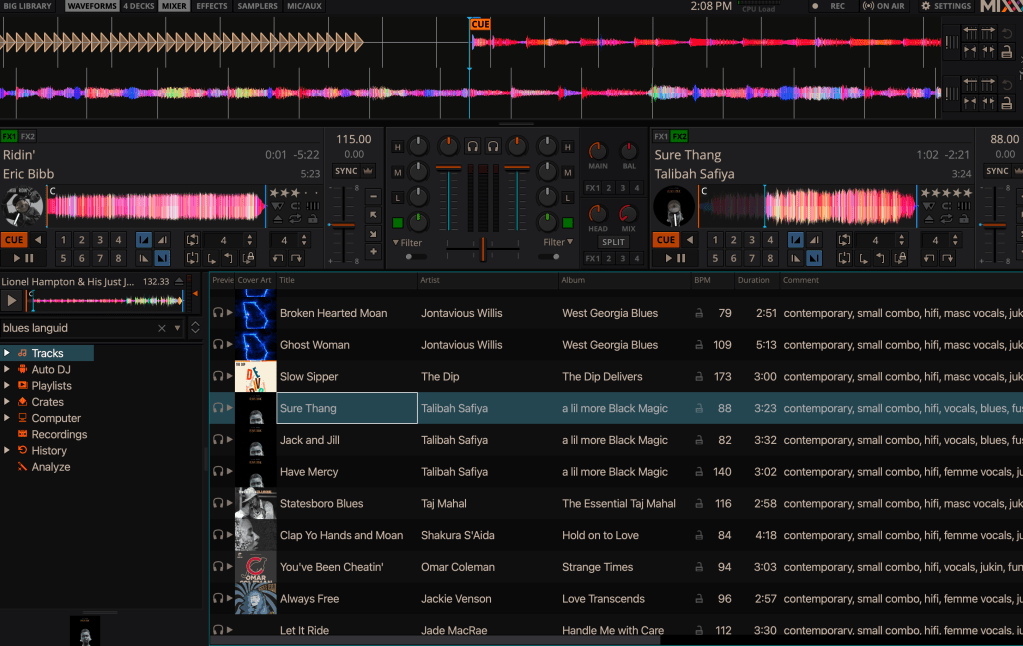
A screenshot of my DJ library setup in Mixxx. “Sure Thang” by Talibah Safiya is playing, “Ridin’” by Eric Bibb is queued next in the other deck, and “Moonglow” by Lionel Hampton is in the preview deck. On the right side you can see the searchable tags I have added to the comments for each track.
How do I tag the tracks in my hard library?
I built my tagging system based on a Reddit post about the “Little Data, Lotta Love” approach. The idea is that when you add a track to your library, you add lots of tags to describe how the track feels and sounds to you. Then later, while you’re DJing, you search your library for a combination of tags that describes what you’re looking for, and presto – the perfect next track is right in front of you.
Over the years, I’ve found this approach is most effective with a consistent set of tags, so I know what to search for while I’m DJing. I add all my tags to the “comments” section of each track, separated by commas. Here is a link to a Google Sheet with some examples of tags that I use. I encourage you to create your own system with the tags that make sense to you!
If you use the built-in Music app on macOS, you can also use the Smart Playlists feature to get the most out of your tags. Smart Playlists can be set up to include all tracks that meet a condition. For example, I have a Smart Playlist that includes all tracks with “blues” and “awesome” in the comments, so this is all my favorite blues tracks. I use Smart Playlists to listen through different segments of my hard library and build my familiarity with the tracks I have.
How do I know which songs to add to my hard library?
The songs to add to your hard library are the ones you think you will DJ more than once. Develop a curator’s mindset – don’t spend money on tracks that are okay but not great. Which ones are the bangers, the ones that get you excited to dance?
I maintain a Spotify playlist called “songs to liberate from spotify” (lol), which is a list of songs I’m planning to buy and add to my hard library. The following kinds of songs tend to go in this list:
- I have it “on repeat” or it’s stuck in my head
- I’m planning to play it in a class
- I love the way it sounds
- It makes me HAVE to dance
- An artist I am excited to support
- Tracks with a clear beat that beginners can dance to – you can never have too many of these!
- Albums that I really enjoy, even if not every track is one I would DJ – The Returner by Allison Russell is a great example
How should I back up my hard library?
One of the benefits of having a hard library is that you’re not renting your music from the internet, but the tradeoff is that if something happens to your laptop and you didn’t back up your hard library, you’re out of luck. I recommend getting an external hard drive and backing up your laptop to it regularly.
I back up my laptop to an external hard drive once a week, and my external hard drive stays at home when I’m on the road DJing. If something were to happen to my laptop, having my external hard drive stored in a separate location means I could restore my hard library on a new laptop later. I also sync most of my hard library to my phone as a secondary backup.
Are music streaming services evil?
I don’t think so, but I do think music streaming services are hurting the relationship between musicians and their fans and supporters.
Musicians are working artists. They deserve to be paid for the years of practice it takes to develop technical skill on an instrument, the creativity and love it takes to write amazing songs, and the patience and effort it takes to record numerous takes in a studio and produce a great-sounding track. Fans deserve opportunities to show their appreciation for all that hard work by supporting the musicians they love. I think streaming services take away those opportunities and get in the way of that relationship.
I do think that streaming services are a useful music discovery tool when used mindfully with a clear goal: to discover artists that you’d like to support directly. I have a paid Spotify subscription, and I’m in a constant process of discovering new artists through Spotify, and then finding them on Bandcamp or looking for other ways to buy their music and see their live shows.
I have questions, can you answer them?
I would be happy to try!
 Mary Blendermann